
Tip 1: Learn the ingredient-to-menu loop first
Everything in the restaurant starts with ingredients. The official gameplay guide describes heading out in search of ingredients for new dishes, then mixing and matching ingredients and recipes with Sanji. Toei Animation's announcement describes the same flow of gathering ingredients and cooking with Sanji.
A finished dish is not the end of the process. Plating and decoration add the finishing touch, and finished dishes are combined with decorative elements into original set menus. Knowing that dishes are building blocks for sets makes the menu screens much easier to read.
Devil Fruit users can also give special assistance in the kitchen, according to Bandai Namco. The publisher has not explained exactly how that assistance changes results. Note when it appears rather than assuming a fixed bonus.
Tip 2: Treat decor as part of the service
Bandai Namco says a great restaurant needs more than great food. More than 200 furniture pieces can be arranged freely, and different furniture creates different moods around your tables. Decor is therefore part of how customers experience your restaurant, not only cosmetic.
Some customers can even open their own special shops inside the restaurant. The launch announcement adds that each setup can attract different characters and turn visitors into loyal regulars. Leave yourself room to experiment instead of locking in one floor plan early.
Tip 3: Read customer requests and preferences
Each of the more than 400 characters has their own preferences for food and decor. Fulfilling customer requests grows your fanbase and encourages people to return again and again. This is the most direct link between your choices and repeat visits that the publisher has confirmed.
Read each request before assuming what a customer wants. The official material says requests matter, but it does not promise that a specific request always unlocks a specific reward. Track what you see in your own save instead of relying on guesses from other games.
Preferences cover decor as well as food, so a request may point you towards furniture rather than a new dish. Bandai Namco says you may also witness memorable interactions and friendships forming within your restaurant. Those moments are a good sign that your regulars are settling in.
Tip 4: Expect a fast tutorial
UnGeek's hands-on preview, published on September 17, 2026, describes a fast-paced tutorial and an initially dense presentation. That is an impression of a short demo build, not a confirmed problem with the final game. It is still a useful warning to take the opening at your own pace.
Bandai Namco's official how-to-play video walks through a day in the life of a rookie staff member. It is embedded at the bottom of this page and plays here without leaving the site. Watching it first makes the cooking, decor and character screens feel familiar before you start.
The demo also showed an Alabasta-themed interior and a limited selection of dishes. Expect more recipes and decor to open up over time rather than all at once. The launch announcement says new recipes and opportunities are discovered across the seas as the restaurant grows.
Tip 5: Pick the right version before you begin
Your first decision happens before the first shift. Nintendo sells separate Nintendo Switch and Nintendo Switch 2 editions. The US Switch listing says the Switch edition cannot be upgraded to the Switch 2 edition and its save cannot be transferred to that edition.
On PC, Steam lists the game as single-player with Steam Cloud and Steam Achievements. Steam Cloud is not evidence of cross-platform saves between PC, Nintendo and mobile. Choose the platform you expect to keep playing on, because no shared save system has been confirmed.
Mobile players should use the official App Store and Google Play listings, both of which name Bandai Namco Entertainment as the publisher. The Apple storefront we checked listed iOS 13.0 or later and iPadOS 13.0 or later. No verified minimum Android version was available when this page was checked, so check the Google Play page on your own device.
Tip 6: Get to know your crew and staff
The 400-plus characters are not only customers. Toei Animation describes them as both staff and guests, and Bandai Namco says characters can interact, work and dine in the restaurant. Their interactions unlock unique events and special moments.
Luffy and the Straw Hat Crew also train to improve their service, according to the official gameplay guide. The publisher has not published the exact effect of that training. Check how your service changes after training rather than assuming a fixed improvement.
Characters appear in a lively pixel art style that Kairosoft is known for. Familiar faces from across the ONE PIECE series visit as customers, each with their own tastes. Getting to know them is part of the fun as well as part of running the restaurant.
Tip 7: Be careful with optimisation claims
Pre-release advice often sounds more precise than the evidence allows. Our research found no verified budget split, hidden free recipe, day-one upgrade priority or guaranteed starter exploit. If a site promises one of these before launch, look for a source.
We will add tested beginner priorities once the full game is available. Until then, the tips on this page describe what to learn, not a measured fastest route. That keeps your first hours flexible while the community gathers real data.
Your first-day checklist
Use this checklist as a short reminder of the confirmed systems. Each item links back to something Bandai Namco or a preview has described. None of them depends on unverified numbers.
- Gather ingredients and try new combinations with Sanji.
- Plate and decorate dishes, then build your first set menu.
- Place furniture and notice how it changes the mood around tables.
- Read customer requests and fulfil the ones you can.
- Watch for characters who return, and what they ask for next.
Where the story begins
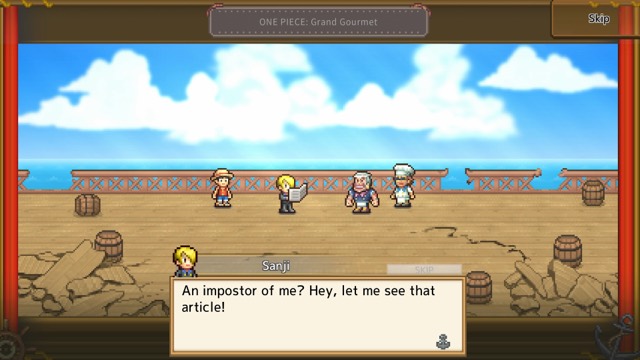
Knowing the premise helps the opening make sense. An impostor Baratie with overpriced food damages the real restaurant's reputation, so Luffy and Sanji open Baratie Number Two. You join them as a rookie staff member on what starts as a modest ship.
The goal is to grow that ship into a renowned floating restaurant. As it expands, you can explore more of the seas and welcome more customers. Our walkthrough page explains how much of the story has been confirmed so far.
Official video
Sources and further reading
- Bandai Namco Europe — Gameplay Guide: A Day at Baratie Number Two (Sep 15, 2026)
- Toei Animation — official announcement (Jul 3, 2026)
- Bandai Namco Europe — launch announcement (Jun 9, 2026)
- UnGeek — hands-on demo impressions (Sep 17, 2026)
- YouTube — How to Play: A Day in the Life of a Rookie Staff Member (Bandai Namco Europe)
- Nintendo US — Nintendo Switch edition
- Steam — ONE PIECE: Grand Gourmet (app 3905010)
- Apple App Store — app 6771652722 (storefront checked Oct 19, 2026)
- Google Play — com.bandainamcoent.op_restaurant